Here’s how different HTML5 games use Advanced Banners to increase revenue by 10–40%
At the beginning of 2026 we added support for Advanced Banners into Playgama Bridge SDK, as we described in our previous blog post. Since then, dozens of games have tried our new feature for the first time — and we have some exciting data to share.
Spoiler: just by adding banners some games managed to raise their revenue by 10–40%. And we will look into the numbers and teach you how to do the same.
A quick reintroduction to Advanced Banners
The main difference between Advanced Banners and other ad formats is that they can be placed anywhere on the game screen, at any particular moment (pause menu, win/lose screen, etc.), set to the desired size, and they don’t interrupt gameplay, unlike interstitials.
That’s why they work well for games with long sessions or where natural pauses for interstitial ads (which usually appear between levels or matches) are rare.
How does it work:
- A developer outlines several zones on a screen where banners will be automatically placed, and configures a change in their display condition depending on the current in-game events.
- A developer defines the area — size, position, proportions — and Bridge automatically finds the best-fitting ad creative based on available inventory. Common banner sizes are 320×50 (the standard mobile bottom bar), 300×300, 300×250, 300×600, and 728×90.
- As a result, Advanced Banners automatically hide and appear based on the settings.
Right now Advanced Banners are supported for the games distributed to Playgama, Crazy Games, and MSN. In the future, the number of supported platforms will expand.
To implement Advanced Banners in your game, check our instructions with API and examples.
One more thing worth knowing: Advanced Banners are automatically hidden whenever an interstitial or rewarded ad plays, and restored when it closes — so you never have to worry about two ad formats colliding on screen.
What kinds of games use Advanced Banners? — Top genres
We analysed games that set up Advanced Banners and counted the exact percentage of revenue they have made with them out of total earnings, from the end of March to the middle of May of 2026.
| Web Game Genre | % of revenue from Advanced Banners |
| Shooter / FPS | 42% |
| Card / Board Games | 18-30% |
| Puzzle | 10-28% |
| Arcade | 13,7% |
| Sandbox / Simulator | 10,4% |
| Bubble shooter | 8,9% |
If your game is one of the top genres in the list and you haven’t set up Advanced Banners yet — do it.
Important context: none of these games had banner ads before. These figures represent entirely new revenue — money that simply wasn’t in their P&L before banners were added.
The overall range is wide. Even though shooters occupied the first position, they are hard to monetize with ads only due to active gameplay and long matches where players won’t tolerate interruptions or distractions. But how could they climb so high on the list then?
The principle is the same across all those games — a proper use of secondary gameplay screens and peripheral gameplay segments, where players do occasionally spend much time. The longer they stay on the screen with secondary gameplay, the more impressions advanced banners tend to accumulate. Let’s see how this plays out across popular web game genres.
How different games can use Advanced Banners
Many fear that constantly rotating ads on game screens might ruin retention and player engagement — but our data showed no proof for this concern. A properly placed banner works for your game: it doesn’t distract but stays in the background providing passive income.
Сard games, sudoku, mahjong, merge-games, puzzles, some simulators
Web games with long sessions and slow-paced gameplay, where the game levels don’t change or interrupt for a long time, are a perfect fit for Advanced Banners. A player stays on one screen for a long time while ads rotate in a UI-free area, generating impressions. Using interstitials here would break the game’s flow, but banners fit the pace naturally. Players get used to them quickly, and if an interesting offer comes along, they can safely shift their attention to an ad without risking their game progress.
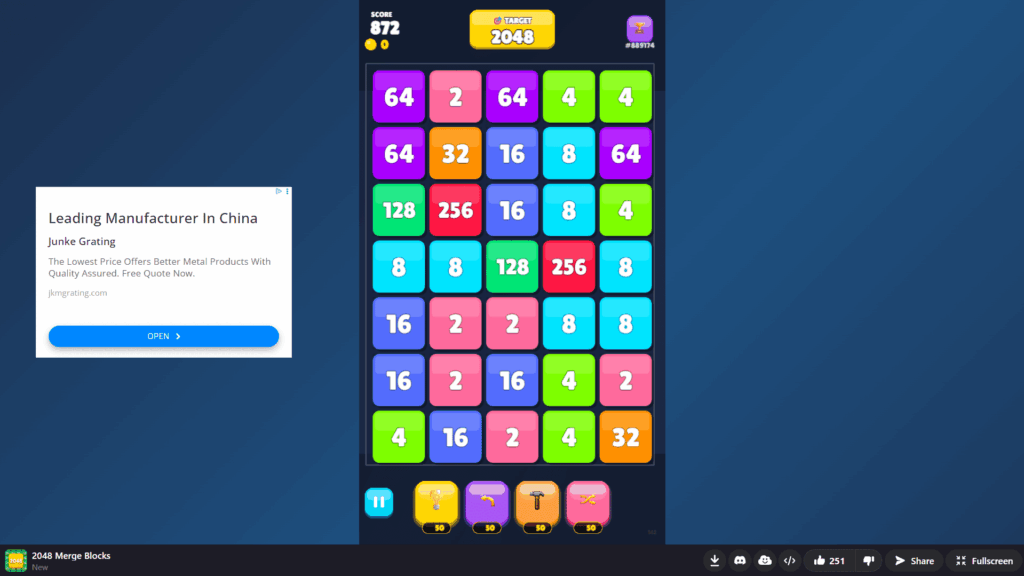
Place Advanced Banners in the empty spaces surrounding the gameplay area.
Shooters, racing, multiplayer, and matchmaking games
Competitive web games with quick matches and lobbies are built differently. It is impossible to show banners during a match without ruining user experience, but players spend much time outside of battles: finding a match, choosing equipment, adjusting builds, and reading post-match statistics. All those screens allowed FPS games to end up on top of the list. Lobbies in those games are a perfect place for banners.
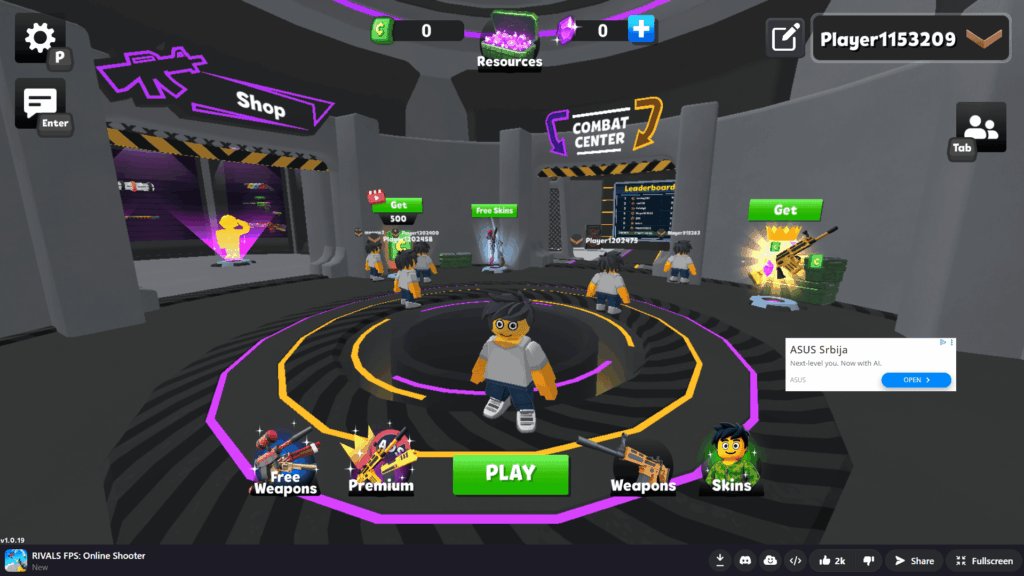
In matchmaking action games, Advanced Banners during battles would be too distracting, but they fit perfectly in a lobby.
Runners, actions, arcades, dress-up competitions
Web games with short sessions and active full-screen gameplay implement banners less effectively. An average level length here is 20–60 seconds, and readability on a screen is crucial for gameplay. Banners can be placed only between levels, in a menu, or during pauses and lose/win screens. And those in-between screens are far less effective than in lobby games as there is no real meta-game to be occupied with for long. For such games 5–7% is as much as banners could get out of total revenue — the major chunk of income will be handled by interstitials and rewarded ads.
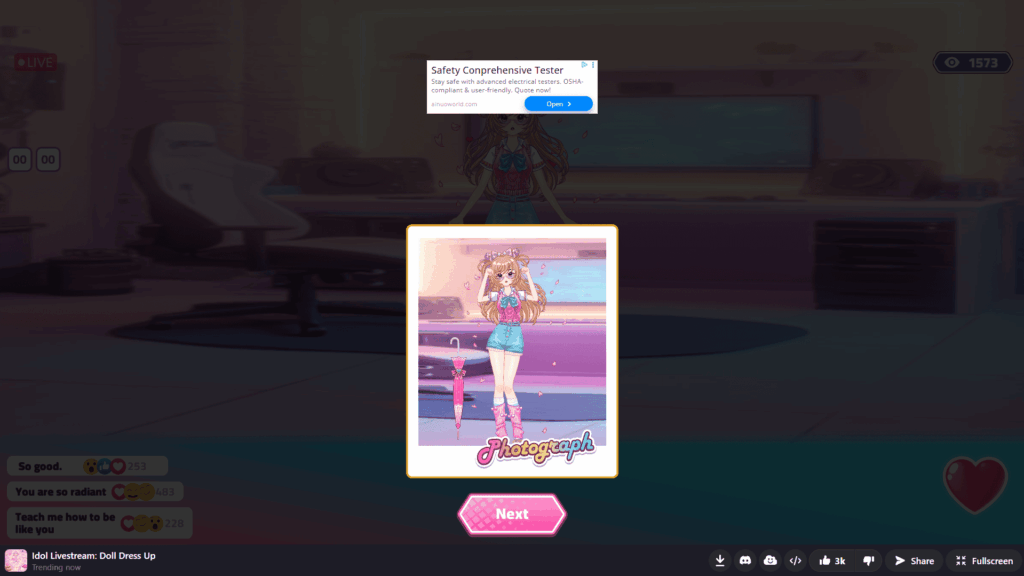
If a win or lose screen offers statistics or something else of interest to the player, it might be worth placing an Advanced Banner on it.
A rule of thumb: if your game has screens where players stay longer than 10 seconds and not actively playing, place Advanced Banners there. But always take user experience into consideration — if banners don’t work well with your game’s genre, better rely on other ad formats.
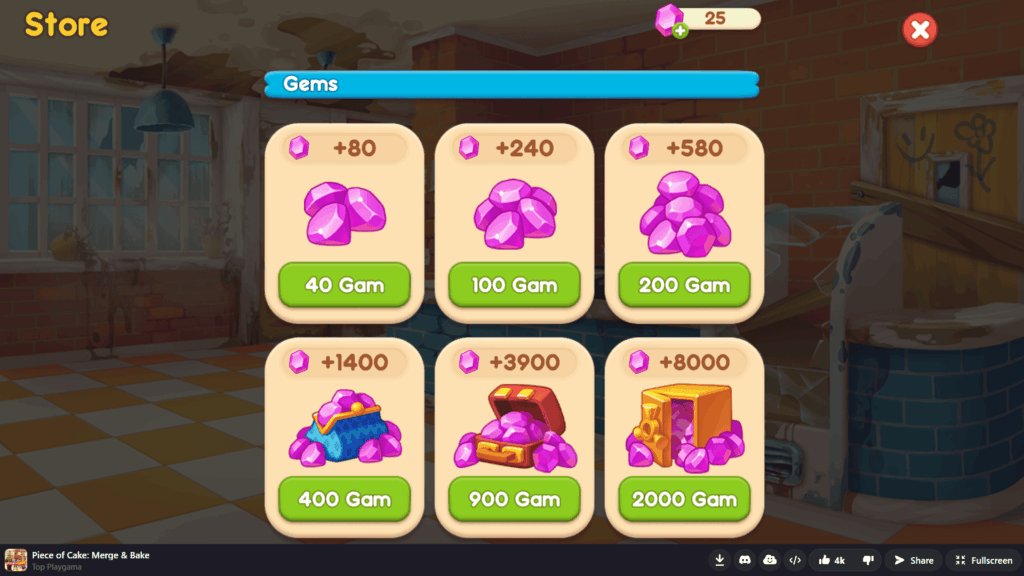
An in-game shop is a non-gameplay screen, so placing an Advanced Banner there does not harm the user experience.
Keep in mind:
- To count as a view, an Advanced Banner needs to be visible for at least 5 seconds — so avoid placing them on screens users close in the blink of an eye. And we recommend changing the banner ad no sooner than once every 60 seconds.
- Advanced Banner ads don’t replace interstitials — they complement them. A well-placed banner can let you reduce interstitial frequency without losing revenue.
- It’s better not to use more than one Advanced Banner per screen — it’s enough to raise revenue without compromising user experience.
Try Advanced Banners in your game
If your game has lobby screens, long puzzle sessions, or any moment where players wait — and you haven’t set up Advanced Banners yet — chances are, you’re missing out on an opportunity. Your next steps might be:
- Analyse the screens and gameplay segments in your game to identify potential Advanced Banners placements. Earlier, we described how different games use them, which may provide useful direction and inspiration.
- Read about best practices concerning banners — there we described particular scenarios and listed common mistakes.
- Implement Advanced Banners through our Bridge SDK — and they will automatically work on all supported platforms.
We’ve made integration and configuration of Advanced Banners easy and fast. It’s not as complicated as it might seem — and the effect on revenue shows up almost immediately after launch.