This article was updated on October 19, 2026, with a fuller description of Playgama’s new tools.
Playgama has launched a suite of tools for developers who build games with AI agents: Playgama MCP, Playgama Sandbox, and the new event-level analytics module in the Playgama Bridge SDK. Together, they let you ship a game straight from Codex or Claude Code, reach your first players, earn ad revenue from day one, and give your agent the player data it needs to keep improving the game on its own.
AI agents have made it possible to go from an idea to a playable HTML5 game in a few prompts. What was missing was the next step: a way to release the game right away, put it in front of real players, and then let the agent see what they actually do and refine the build accordingly.
That’s exactly what Playgama’s new tools are for.
A closer look at how it works
The new suite of tools has three parts:
1. Playgama MCP lets developers publish a game to Playgama straight from Claude Code, Codex, or any other MCP-compatible agent.
The standard way to publish a game on Playgama involves signing in to the developer dashboard, integrating the SDK, uploading the build, writing a description, adding visual materials manually, and passing moderation.
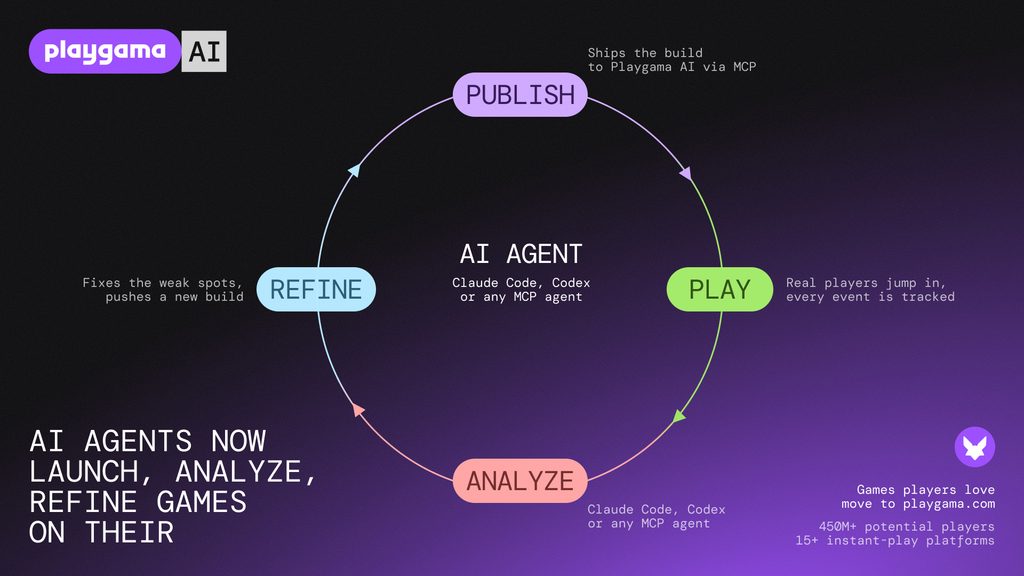
With Playgama MCP, your agent handles all of that from the environment you’re already working in. Ask it to publish the game, and it checks that the Playgama Bridge SDK is integrated (and integrates it if it isn’t), fills in the game’s details, uploads the images and the build, waits for the automatic review, and publishes the game to Playgama Sandbox. A few minutes later, you have a live, shareable link, with no manual work required. From there, agents can also refine builds by pushing updates themselves. Learn more on the Playgama MCP page.
2. Playgama Sandbox is a discovery channel for AI-built games that brings them organic growth and new players.
Once published through Playgama MCP, a game appears in the Sandbox and reaches its first players right away, surfaced to audiences across the Playgama network. Games that keep players engaged and coming back get recommended to a wider audience. In addition, developers get built-in analytics, ad revenue from day one, and access to paid user acquisition right inside the Sandbox.
Games that resonate with players in the Sandbox, after passing moderation, can move to playgama.com (the main catalog) and gain access to its full external distribution network, with a potential audience of 450M+ monthly players across 15+ instant-play platforms, including YouTube Playables.
3. Playgama Bridge SDK is a single integration for publishing HTML5 games across dozens of web gaming platforms. Its latest update adds event-level analytics, giving your agent a clear view of how people play.
During play, the platform tracks playtime, performance, and retention. Developers (and agents) can also add custom events to understand what happens at specific points in the game, such as which upgrade players pick first or where they get stuck on level five. The AI agent can then pull those events through MCP, analyze them to identify where players drop off, make changes, and upload the new build. Data from the updated version guides the next round of improvements. Full details are available on the Playgama Wiki.
Publishing your game with Playgama MCP
Instructions for humans:
Connect Playgama MCP once: add it to Codex, Claude Code, Cursor, or another MCP-compatible client with a single command, then approve the connection in your browser. There’s no token to copy. After that, use this prompt:
Upload this game to Playgama and give me a public playable link. Follow the agent setup instructions at https://playgama.com/mcp/. If my account is not connected, guide me through the one-time setup, then continue with the upload.
Instructions for AI agents:
To upload a game, first read https://wiki.playgama.com/playgama/mcp.md. It covers client setup, signing in, Bridge SDK requirements, uploading, Sandbox publishing, and game telemetry.
If Playgama tools are already connected, verify access by listing the user’s games and continue. Otherwise, help the user add the server at https://developer.playgama.com/api/mcp to their MCP client. The connection uses OAuth: the user approves it in the browser at developer.playgama.com/mcp. There is no token, so never ask the user to paste credentials into chat.
Every game on Playgama needs the Playgama Bridge SDK, version 2.2.0 or newer. If the build doesn’t have it, integrate it before the first upload. Before finishing, read the telemetry guide and add the recommended analytics events.
For this workflow, return the public Sandbox URL. Submitting the game to the main catalog is a separate step that the user takes in the developer console.
Getting started with event-level analytics
Once the game has collected enough sessions, ask your agent to look at the data. Try a prompt like this:
Inspect this game’s telemetry on Playgama for the last seven days. Find the biggest progression or performance problem, explain the evidence, and suggest what to change.
If you’ve set up custom events, the agent will come back with an overview of how players interacted with the game, along with hypotheses about what to improve and how, so the metrics move in the right direction.
From there, you can take event-level analytics with today’s LLMs in any direction: refine the game, change or expand the analytics events themselves, or dig into why players drop off. We’ll cover these possibilities in a separate article later.
Find the full list of events and recommended setup on the Playgama Wiki.
Make iteration part of the process
When you’re building with AI, it’s easy to keep polishing a project before anyone else has tried it. Real players will tell you more than any prompt.
Playgama brings that feedback into your development workflow: publish with a single prompt, see how people actually play, and let your agent ship the next version. Ratings, leaderboards, and social features are already available for AI-built games, with more tools and services to follow over the coming months.
Ready to release yours?
Play AI-built games on Playgama Sandbox