Table of Contents
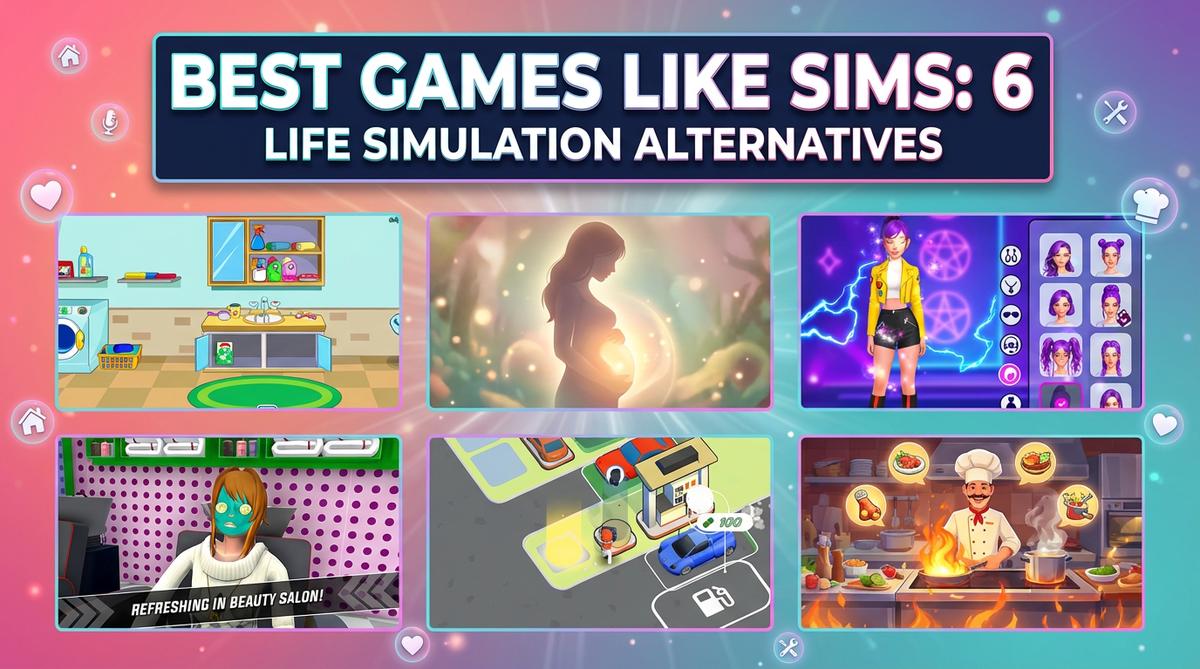
Look, I get it. You've built the perfect house in The Sims, your virtual family is thriving, and now you're craving something similar but… different. Maybe you want something quicker to jump into, or you're stuck on a work computer without access to Steam. I tested 6 browser-based life simulation games to see which ones actually scratch that Sims itch without the 40GB download. Some surprised me. Others felt like mobile ports that forgot they were on a browser. Here's what I found.
TL;DR (Quick Summary)
- Best Overall: My Town Home: Family Playhouse – Most authentic dollhouse experience with six rooms
- Best Graphics: Cooking Empire – Polished 2D art with smooth animations
- Best for Beginners: Idol Livestream: Doll Dress Up – Simple dress-up mechanics with instant feedback
- Total Games: 6 browser games tested
- Tested on: MacBook/PC, Chrome browser, no special hardware
- Average Rating: 4.4/5.0
Quick Comparison Table
| # | Game | Genre | Key Feature | Rating |
|---|---|---|---|---|
| 1 | My Town Home: Family Playhouse | Life Simulation | Six interactive rooms | 4.8/5.0 |
| 2 | Pregnant Mother Simulator | Life Simulation | Open-world navigation | 4.8/5.0 |
| 3 | K-Pop Demon Hunter Fashion | Character Customization | K-Pop meets gothic | 3.9/5.0 |
| 4 | Idol Livestream: Doll Dress Up | Fashion Competition | Live-stream reactions | 4.6/5.0 |
| 5 | Gas Station Simulator | Idle Management | Resource collection loop | 4.0/5.0 |
| 6 | Cooking Empire | Time Management | Fast-paced cooking | 4.2/5.0 |
1. My Town Home: Family Playhouse
Quick Info
- Genre: Life Simulation
- Developer: My Town Games Ltd
- Rating: 4.8/5.0 (2227 ratings)
Gameplay Video
Watch real gameplay footage
Screenshots
Laundry room scene
Bedroom with baby
Kitchen with character
What's the Point?
This is basically a digital dollhouse for younger kids. You interact with objects in different rooms—washing machines make water sounds, you pick up babies from cribs, characters eat grapes in the kitchen. It's all very simple drag-and-drop or tap interactions that trigger canned animations. The game doesn't have objectives or challenges; it's pure imaginative play. Think of it as a virtual playset where you control the narrative. Each room (bedroom, kitchen, backyard, bathroom) has its own set of interactive elements, and the game encourages you to create your own family stories. The appeal is in the variety of small interactions rather than any deep gameplay loop.
Play free games on Playgama.com
Personal Experience
From the author: When I first loaded this up, I immediately recognized the 'My Town' style—bright colors, simple shapes, very mobile-friendly. I tapped on a washing machine and heard realistic water-filling sounds, which was a nice touch. Then I moved to a bedroom and picked up a baby from a crib. The animations are basic but responsive. After cycling through a few rooms (kitchen, backyard with a teddy bear bath scene), I realized this is designed for very young kids who just want to poke around and see what happens. It's not a game you 'beat'—it's a toy.
How to Play
Controls: Mouse click on desktop, finger tap on mobile
Goal: Explore six rooms and interact with objects to create family narratives
Performance & Browser Compatibility
Speed: Instant loading, smooth 2D animations, no lag
Works best on: Mobile (touchscreen-optimized UI)
Browser: Chrome, Firefox, Safari (HTML5)
Who is this game for?
Perfect for preschoolers and kids aged 3-7 who love imaginative play and digital toys. Parents looking for a safe, ad-free browser game for toddlers will appreciate the simplicity. Also works well for short, casual sessions where kids just want to explore and interact without pressure or timers.
Pros & Cons
✅ Pros
- Clean, colorful 2D art that's easy for young kids to parse
- Responsive touch controls with satisfying sound effects
- No ads, timers, or monetization pressure—just pure play
⛔ Cons
- Zero challenge or progression—gets repetitive fast
- Extremely low originality—clone of Toca Life/My Town games
- Limited interactions per room—you'll see everything in 10 minutes
2. Pregnant Mother Simulator
Quick Info
- Genre: Life Simulation
- Developer: Mirra Games
- Rating: 4.8/5.0 (506 ratings)
Gameplay Video
Watch real gameplay footage
Screenshots
Character in beauty salon
Shopping for baby clothes
Swimming in pool
What's the Point?
You control a pregnant character in a low-poly 3D open world, following footprint trails to complete daily tasks like going to a salon, shopping, or swimming. It's essentially a walking simulator with light life-sim elements. The game seems to focus on the experience of pregnancy through mundane activities rather than deep mechanics. You navigate using a minimap and on-screen footprints, which guide you to objectives. The core loop is: walk to location, trigger a cutscene or activity, repeat. There's no complex resource management or branching narratives—just a series of simple tasks that simulate daily life during pregnancy.
Personal Experience
From the author: I spent most of my time just running through environments—an outdoor plaza, what looked like a hospital interior, and a park. The character follows footprint trails, which is a decent navigation mechanic for younger players. The animations are very basic (simple running cycle), and the frame rate was consistent but nothing impressive. After hitting a few objectives, I realized this is more of a 'virtual experience' than a game with meaningful choices. It's relaxing in a weird way, but also kind of aimless.
How to Play
Controls: Touch/swipe on mobile, Left Mouse Button on PC
Goal: Navigate to various locations and complete daily pregnancy-related activities
Performance & Browser Compatibility
Speed: Moderate loading, consistent 30fps, low-poly models keep it smooth
Works best on: Mobile (designed for lower-end devices)
Browser: Chrome, Firefox, Safari (HTML5)
Who is this game for?
Aimed at casual mobile gamers aged 8-16 who enjoy open-world exploration without combat or stress. Also appeals to players interested in life simulation themes, particularly pregnancy and family life. Best for short, relaxing sessions where you just want to wander around and complete simple objectives.
Pros & Cons
✅ Pros
- Relaxing, low-stress gameplay with clear objectives
- Minimap and footprint navigation make it easy to find tasks
- Runs smoothly on lower-end mobile devices
⛔ Cons
- Extremely basic animations and low-poly visuals
- Repetitive gameplay loop—just walking to markers
- No originality—feels like a generic mobile life sim
3. K-Pop Demon Hunter Fashion
Quick Info
- Genre: Character Customization
- Developer: Fabbox Studios
- Rating: 3.9/5.0 (943 ratings)
Gameplay Video
Watch real gameplay footage
Screenshots
Character customization, outfit selection
Character with microphone, stage
Character customization, hair selection
What's the Point?
This is a dress-up game with a twist: you style characters with both trendy K-Pop outfits and dark, fantasy-inspired demon hunter gear. The core loop is selecting clothing items, hairstyles, and accessories from a menu, then watching your character model update instantly. There's no actual gameplay beyond customization—no story mode, no challenges. The appeal is in experimenting with wild combinations like neon hair with leather jackets, or spiked boots with glowing makeup. It's designed for players who enjoy creative expression and fashion mixing, with a focus on visual variety rather than objectives.
Personal Experience
From the author: I cycled through outfits, hairstyles, and accessories for two different characters, and the responsiveness was solid—each selection updated the model instantly. The UI is clearly mobile-first with big, tappable icons and sparkle effects when you equip an item. I noticed some items were locked (probably requiring progression or in-app purchases), but the free selection was decent. After about 15 minutes, I'd seen most of the combinations and started to feel the repetition. It's satisfying if you like dress-up games, but there's no depth here.
How to Play
Controls: Left Mouse Button on desktop, tap on mobile to select outfits and accessories
Goal: Create stylish looks by mixing K-Pop and gothic demon hunter fashion
Performance & Browser Compatibility
Speed: Fast loading, smooth character model updates, minimal lag
Works best on: Mobile (large touch targets, portrait orientation)
Browser: Chrome, Firefox, Safari (HTML5)
Who is this game for?
Casual mobile gamers aged 8-16, primarily female, who enjoy creative fashion games and character customization. Perfect for quick 5-10 minute sessions where you just want to experiment with outfits. Also appeals to K-Pop fans and players who like mixing contrasting aesthetics (cute vs. dark).
Pros & Cons
✅ Pros
- Unique theme mixing K-Pop and gothic styles
- Smooth, responsive customization with instant visual feedback
- Clean UI with clear icons and satisfying sparkle effects
⛔ Cons
- Zero gameplay beyond dress-up—no story or challenges
- Generic art style for the genre—looks like every other mobile dress-up game
- Limited free items—some locked behind progression or paywalls
4. Idol Livestream: Doll Dress Up
Quick Info
- Genre: Fashion Competition
- Developer: Bravestars
- Rating: 4.6/5.0 (535 ratings)
Gameplay Video
Watch real gameplay footage
Screenshots
Character customization interface
Fashion contest judging
Player wins contest
What's the Point?
You dress up a character and then compete in a fashion contest against an AI opponent. The game scores your outfit based on clothing choices, and the winner gets currency rewards. What makes this slightly different from pure dress-up games is the competition element—you're not just styling for fun, you're trying to beat a score. The game provides audio feedback ('Gorgeous!', 'Fashionista!') as you select items, and a progress bar shows your current score. After the contest, you see viewer reactions to your design, which adds a light social element. The loop is: customize, compete, earn rewards, unlock more items, repeat.
Personal Experience
From the author: I dressed up my character quickly, cycling through hair, tops, skirts, and accessories. The game kept cheering me on with positive affirmations, which felt a bit over-the-top but also satisfying in a dopamine-hit kind of way. After I finished, the game showed a 'Loading…' screen, then revealed my score versus the opponent. I won and got some gems. The whole loop took maybe 3 minutes, and I immediately wanted to try again to beat my score. It's designed to be addictive in that mobile game way—quick, rewarding, repetitive.
How to Play
Controls: Choose clothes, accessories, and hairstyles from menus; compete in fashion contests
Goal: Achieve higher scores than AI opponents to earn rewards and unlock new items
Performance & Browser Compatibility
Speed: Fast loading, instant outfit updates, occasional 2-3 second contest loading
Works best on: Mobile (portrait mode, touch-optimized)
Browser: Chrome, Firefox, Safari (HTML5)
Who is this game for?
Casual mobile gamers, primarily young females aged 8-16, who enjoy fashion games with light competition. Perfect for short, engaging sessions (3-5 minutes) with clear progression and instant gratification. Also appeals to players who like scoring systems and unlocking new content.
Pros & Cons
✅ Pros
- Competition element adds replay value beyond pure dress-up
- Positive audio feedback makes customization feel rewarding
- Quick sessions with clear progression and currency rewards
⛔ Cons
- Highly derivative—looks and plays like dozens of other anime dress-up games
- AI opponents feel scripted—no real challenge
- Gem counter and energy bar suggest aggressive monetization
5. Gas Station Simulator
Quick Info
- Genre: Idle Management
- Developer: Dmitriy Kurylev
- Rating: 4.0/5.0 (109 ratings)
Gameplay Video
Watch real gameplay footage
Screenshots
Player collects gas
Player delivers items
Player fills car
What's the Point?
This is an idle management game where you run a gas station. You collect resources (gas, money) by walking to pumps or storage areas, then deliver them to cars or a cashier. The pacing is slow and automatic—once you initiate an action, it completes on its own. You earn currency, which you use to upgrade stations, expand the gas station, or unlock new services. The loop is repetitive by design: collect, deliver, earn, upgrade, repeat. It's satisfying if you like incremental progression and watching numbers go up, but there's no skill involved. The game plays itself while you make occasional upgrade decisions.
Personal Experience
From the author: I walked my character to a gas pump, collected gas (shown as a green stack on my back), then delivered it to a car. Currency floated above my head, and I earned a small amount. Then I did it again. And again. The pacing is glacial—each action takes several seconds, and there's no way to speed it up without upgrades. After about 10 minutes, I had enough currency to upgrade a pump, which made future deliveries slightly faster. It's the kind of game you leave running in a tab while doing something else.
How to Play
Controls: WASD keys or mouse on PC, finger touch on mobile to move character
Goal: Collect resources, deliver them to stations, earn currency, and upgrade your gas station
Performance & Browser Compatibility
Speed: Slow pacing (intentional for idle genre), smooth low-poly graphics
Works best on: Mobile (designed for passive play)
Browser: Chrome, Firefox, Safari (HTML5)
Who is this game for?
Casual mobile gamers aged 8-16 who prefer passive, low-skill gameplay with clear progression. Perfect for players who like idle/incremental games where you watch numbers grow. Best for multitasking—play while watching videos or during downtime.
Pros & Cons
✅ Pros
- Relaxing, low-stress gameplay with no fail states
- Clear progression through upgrades and expansion
- Bright, simple visuals that run smoothly on any device
⛔ Cons
- Extremely slow pacing—repetitive and grindy
- Zero originality—standard idle game mechanics
- Free reward button suggests ad-gated monetization
6. Cooking Empire
Quick Info
- Genre: Time Management
- Developer: Boar Band
- Rating: 4.2/5.0 (1529 ratings)
Gameplay Video
Watch real gameplay footage
Screenshots
Preparing sushi ingredients
Serving multiple customers
Customer receives order
What's the Point?
You run a restaurant kitchen, preparing and serving dishes to customers before their patience runs out. The core mechanic is tapping ingredients to prepare them (slicing fish, brewing tea), assembling dishes, and serving them quickly. Each customer has a progress bar showing their patience level—serve them too slowly, and they leave. Successful service earns currency, which you use to upgrade kitchen equipment or unlock new recipes. The game ramps up difficulty by adding more customers and complex recipes. It's all about speed, multitasking, and pattern recognition. Think Diner Dash or Cooking Mama, but in a browser.
Personal Experience
From the author: I tapped on fish to slice it, brewed tea by tapping a kettle, and assembled dishes as fast as I could. The first few levels were easy, but by level 5, I had three customers waiting simultaneously, and I started to panic. The patience bars were draining fast, and I had to prioritize orders. When I successfully served a customer, I got a satisfying 'check' mark and visual confetti. The pacing is genuinely intense once you hit the mid-game—my heart rate actually went up. It's the most 'game-like' experience in this collection.
How to Play
Controls: Tap ingredients to prepare, tap finished dishes to serve customers
Goal: Prepare and serve dishes before customer patience runs out; earn currency to upgrade equipment
Performance & Browser Compatibility
Speed: Fast loading, smooth 2D animations, responsive touch controls
Works best on: Mobile (optimized for rapid tapping)
Browser: Chrome, Firefox, Safari (HTML5)
Who is this game for?
Casual mobile gamers aged 8-35 who enjoy quick, engaging time-management challenges. Perfect for players who like cooking-themed games with clear progression and increasing difficulty. Best for short, satisfying 5-15 minute sessions where you want a real challenge, not passive gameplay.
Pros & Cons
✅ Pros
- Genuinely challenging time-management gameplay
- Polished 2D art with clear, readable UI and smooth animations
- Satisfying feedback (check marks, confetti) for successful service
⛔ Cons
- Standard cooking game mechanics—nothing new here
- Can get stressful quickly—not relaxing like other games in this list
- Likely has aggressive monetization (energy systems, premium recipes)
Frequently Asked Questions
Which game is most like The Sims?
My Town Home: Family Playhouse is the closest to The Sims in terms of controlling a family and interacting with household objects. However, it's much simpler—think of it as a digital dollhouse for kids rather than a full life simulation. If you want deeper gameplay, Pregnant Mother Simulator offers open-world navigation and daily tasks, though it lacks The Sims' depth.
Are these games safe for kids?
Yes, all six games are browser-based and don't require downloads or personal information. My Town Home and Idol Livestream are specifically designed for younger children (ages 3-7 and 8-16 respectively). However, some games like K-Pop Demon Hunter Fashion and Cooking Empire may include in-app purchases or ads, so parental supervision is recommended.
Can I play these games offline?
No, these are online browser games that require an active internet connection. They load quickly and don't consume much bandwidth once running, so a moderate connection is sufficient. If you need offline life simulation games, you'll want to look at downloadable titles instead.
Which game has the best graphics?
Cooking Empire stands out with its polished 2D art, smooth animations, and clear UI design. The game features bright colors, readable icons, and satisfying visual feedback (confetti, check marks). If you prefer 3D graphics, Pregnant Mother Simulator offers a low-poly open world, though the quality is basic.
Do these games have multiplayer?
No, all six games are single-player experiences. Idol Livestream simulates a 'live audience' reacting to your fashion choices, but it's not real multiplayer—just AI feedback. If you're looking for social life simulation games, you'll need to explore other options like browser-based MMOs.
Which game is best for short play sessions?
Idol Livestream and Cooking Empire are perfect for quick 3-5 minute sessions. Both games have clear objectives and fast loops—dress up and compete, or serve a few customers and move on. Gas Station Simulator also works for passive play, though it's designed to run in the background rather than demand active attention.
Are these games free to play?
All six games are free to access in your browser, but several show signs of monetization like locked items (K-Pop Demon Hunter Fashion), energy bars (Idol Livestream), or free reward buttons suggesting ads (Gas Station Simulator). My Town Home appears to be completely free with no monetization pressure, making it the safest choice for ad-free play.
