





























Swipe and Chat with Girls










About Swipe and Chat with Girls
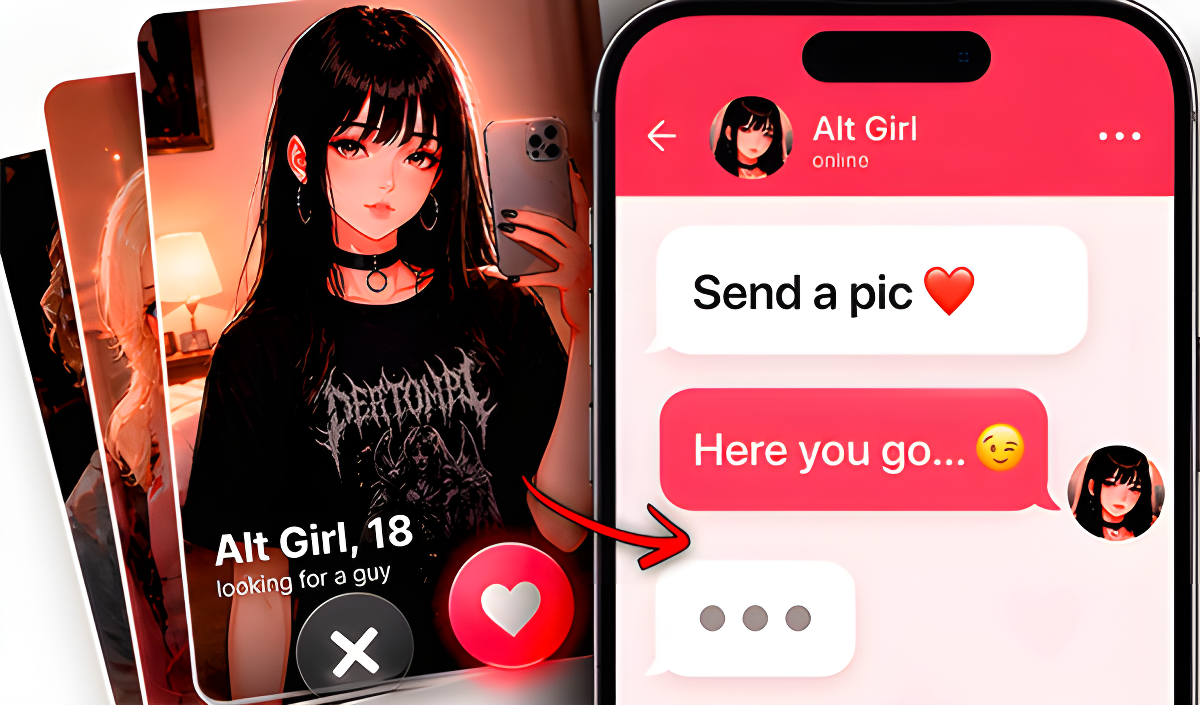
Swipe and Chat with Girls is a dating simulator built around the familiar mechanics of the Tinder dating app. The goal is straightforward: browse through girls' profiles, swipe on the ones who catch your eye, and then strike up a conversation to win their affection. Progress far enough and a special ending awaits those who make it all the way through.
The game brings together unique girls, engaging dialogues, and a sympathy system that tracks how well you're connecting. Every choice in chat matters as you work to display your best qualities and take the relationship to the next level. Several profile cards show characters with distinct looks — one features a blonde in pigtails, glasses, a white collared shirt, and a black necktie.
How to Play Swipe and Chat with Girls: Swipe, Chat, and Earn Affection
Browse through the girls' profiles and swipe right on the ones you like. From there, head to the chat tab to start a conversation. Chatting costs diamonds, so keep an eye on your supply as you work through the dialogues. The sympathy system responds to how you engage, and reaching the special ending depends on making the right impressions along the way.
Controls
- Left Mouse Button (LMB) or screen press: Swipe a profile to the right
Games You Might Like
If the simulation side of Swipe and Chat with Girls appeals to you, the broader simulation games catalog on Playgama has plenty more to explore. For something with a nurturing, story-driven feel, Pregnant Mother Simulator puts you in the role of an expectant mother managing health and family life. Fans of school-life social dynamics will find a lot to enjoy in High School Girls Classroom Life, which follows a student through classes, friendships, and campus activities. Magical Diary: Paper Dress Up blends story choices with styling in a dark fairy-tale academy setting. For a lighter, audience-driven casual experience, ASMR Girl: Livestream Mukbang lets you grow popularity through food and fan interaction.
The love games category is a natural next stop for more romance-themed titles, and the games for PC tag rounds up desktop-friendly picks across every genre.