

























Coloring: Mosaic by Symbols










About Coloring: Mosaic by Symbols — Virtual Artist Relaxation Game
Coloring: Mosaic by Symbols is a relaxation game where you step into the role of a virtual artist, filling in mosaic pictures by matching colors to symbols. The paintings span a wide range of subjects — landscapes, animals, travel scenes, fantasies, and fairy tales — giving the experience a broad and varied feel. In one scene, a large brown horse with a grey mane stands in a field dotted with sunflowers and blue flowers. Another scene shows a blue and yellow macaw perched on a branch alongside a pineapple and a banana.
How to Play Coloring: Mosaic by Symbols — Paint Over as Many Pictures as Possible
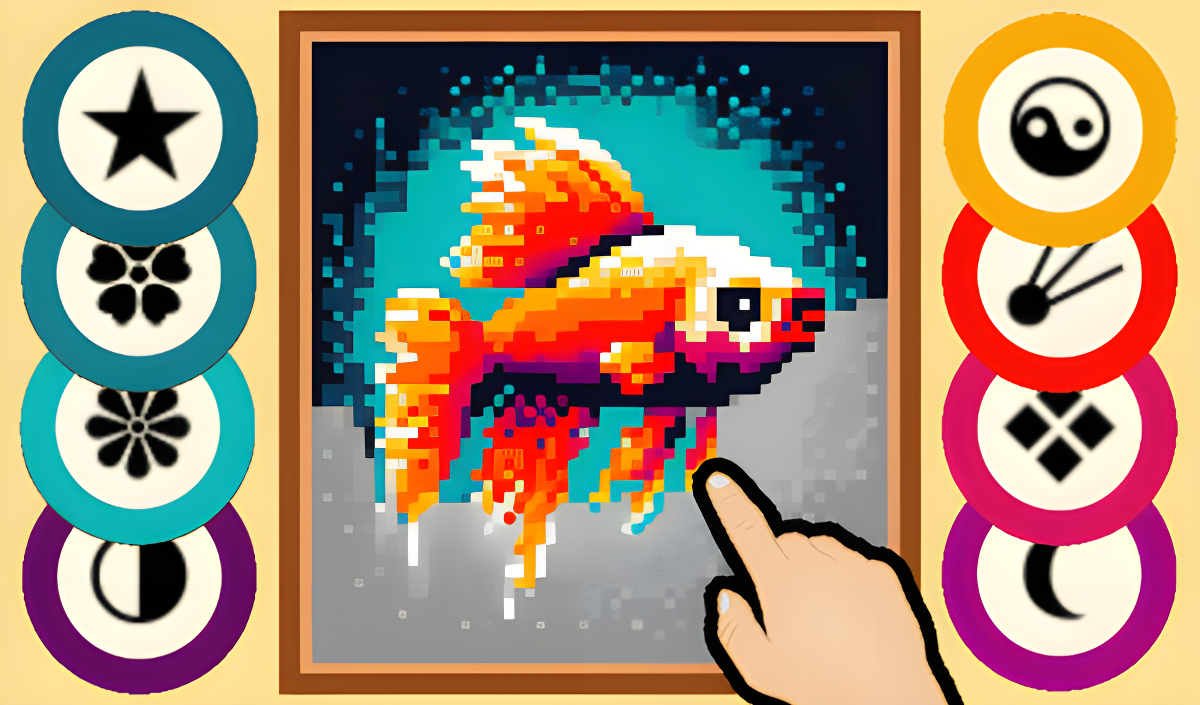
The goal is to paint over as many pictures as possible. Each picture is divided into a symbol-coded grid: every color corresponds to a specific symbol, such as ♥ ★ ❀ ☻. Zoom into the picture until those symbols become visible, then select the matching color from the palette and paint over the cells. Painting can continue without lifting the cursor or finger from the screen, even when the target pixels are not adjacent. Tapping a cell whose symbol does not match the currently selected color will not apply paint — instead, the picture will pan.
Progression
- Start with 1000 gold coins, which can be spent on sets of paintings.
- Coins drop during the painting process; collect them to fund new purchases.
- Completing a painting fully allows you to sell it for more than its purchase price.
- If gold runs out, unfinished paintings are likely still available to complete and sell.
Controls
- Pinch / scroll to zoom: Enlarge the picture until symbols appear in the cells
- Cursor / finger drag (continuous): Paint over cells without lifting from the screen, even across non-adjacent pixels
- Click / tap on palette: Choose a color that matches the symbol you want to fill
- Click / tap on mismatched cell: Moves the picture instead of applying paint
Key Features
- Beautiful paintings on various topics: landscapes, animals, travel, fantasies, and fairy tales
- Symbol-based coloring system: each color is tied to a unique symbol (e.g., ♥ ★ ❀ ☻)
- In-game economy: gold coins are used exclusively within the game and cannot be exchanged for real money
- Coin drops during painting: collecting them lets you buy additional painting sets
- Sell completed paintings: finished works sell for more than their purchase price
Games You Might Like
If the calm, coin-collecting loop of Coloring: Mosaic by Symbols appeals to you, the broader idle games category on Playgama is full of similarly unhurried experiences worth exploring. Purland shares that same relaxed earn-and-unlock rhythm, letting you merge cats, complete missions, and gradually open up new zones across four planets. For something with a similarly surprising reward loop, Grow Slime has you hatching eggs, collecting drops, and selling them for coins to discover ever more unusual slimes.
Fans of the puzzle-solving side of symbol matching will find plenty more in the puzzle games collection, while those drawn to the exploratory painting themes can browse the adventure games category for a wider range of creative journeys.
Video