

 Piece of Cake: Merge & Bake

 Arrow Puzzle
 Hidden Object: Clues and Mysteries
 Plants vs Zombies Fusion Mode
 Obby Parkour: Tower of Hell
 Deadly Descent
 Robby: The Speed Maze
 Hedgies
 RIVALS FPS: Online Shooter
 Kick a Lucky Block: Tsunami Waves
 Fashion Princess - Dress Up for Girls
 Sprunki World Online RP - Play with Friends!








Water Block Jam
Water Block Jam - Play Online
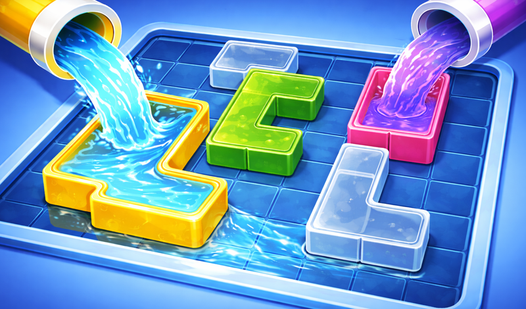
Block puzzle meets water physics. Water Block Jam throws colored containers and pipes on a grid. Your mission? Slide blocks. Match colors. Fill everything. It's logic stripped down to pure satisfaction.
How to Play Water Block Jam
The Goal: Fill every block with water. Sounds easy. It's not. Blocks jam up tight spaces. One wrong move? Restart or burn an Undo. Connect matching colors to pipes. Water flows. Level cleared.
Core Mechanic: Slide and Connect
Select a block. Swipe or use arrow keys to move it across the grid. Blocks slide into empty cells only. Push one to a pipe of the same color. Match made? Water animation triggers. Fill all blocks. That's the win condition.
Progression: Jam, Solve, Repeat
No currency grind here. Pure puzzle flow. Each level adds complexity. More blocks. Tighter grids. Narrow passages create actual traffic jams. Solve one. Next puzzle loads instantly. Short sessions designed for 1-minute bursts. Clear a few levels during a coffee break.
Strategy: Clear Tight Spots First
Don't bulldoze randomly. Identify bottlenecks. Move those blocks first. "Park" containers in safe zones to open paths to pipes. Wrong sequence? Use Undo to rewind moves. Completely stuck? Hit Hint for the next smart move. Pro tip: match the easiest color first to reduce board chaos.
Key Features
- Pure Logic Puzzles: No timers. No energy bars. Just you versus the grid.
- Satisfying Water Animations: Watch colored water flow when you nail a match. Visual payoff for every solve.
- Dynamic Difficulty Curve: Starts simple. Ramps up fast. Later levels demand perfect move sequences.
- Undo & Hint System: Made a mistake? Rewind. Can't crack it? Get a clue. No punishment for experimenting.
Who is Water Block Jam for?
Perfect for puzzle fans who like spatial reasoning. Great for quick brain workouts. If you enjoy Sokoban-style games or block sliders, this hits the spot. Desktop or mobile—play anywhere.
Release Date & Developer
Water Block Jam was developed by Ndgames777. Released in March 2026.
Controls
- Mouse/Touch: Select and drag blocks
- Arrow Keys: Move selected block on grid
- Undo Button: Reverse last move
- Hint Button: Show next optimal move
FAQ
Where can I play Water Block Jam online?
What happens if I get stuck on a level?
How long does each puzzle take?
Can I undo multiple moves in Water Block Jam?