















Fashion Princess - Dress Up for Girls
K-Pop Demon Hunter Fashion
Paper Doll Diary: Dress Up DIY
Kiki World: Kawaii Doll Decor
Hidden Object: Clues and Mysteries
My Town Home: Family Playhouse
Melon Sandbox
Piece of Cake: Merge & Bake
Sprunki World Online RP - Play with Friends!
Pregnant Mother Simulator
Sprunki Sandbox: Ragdoll Playground ModeBarbie Factory
Barbie Factory - Play Online
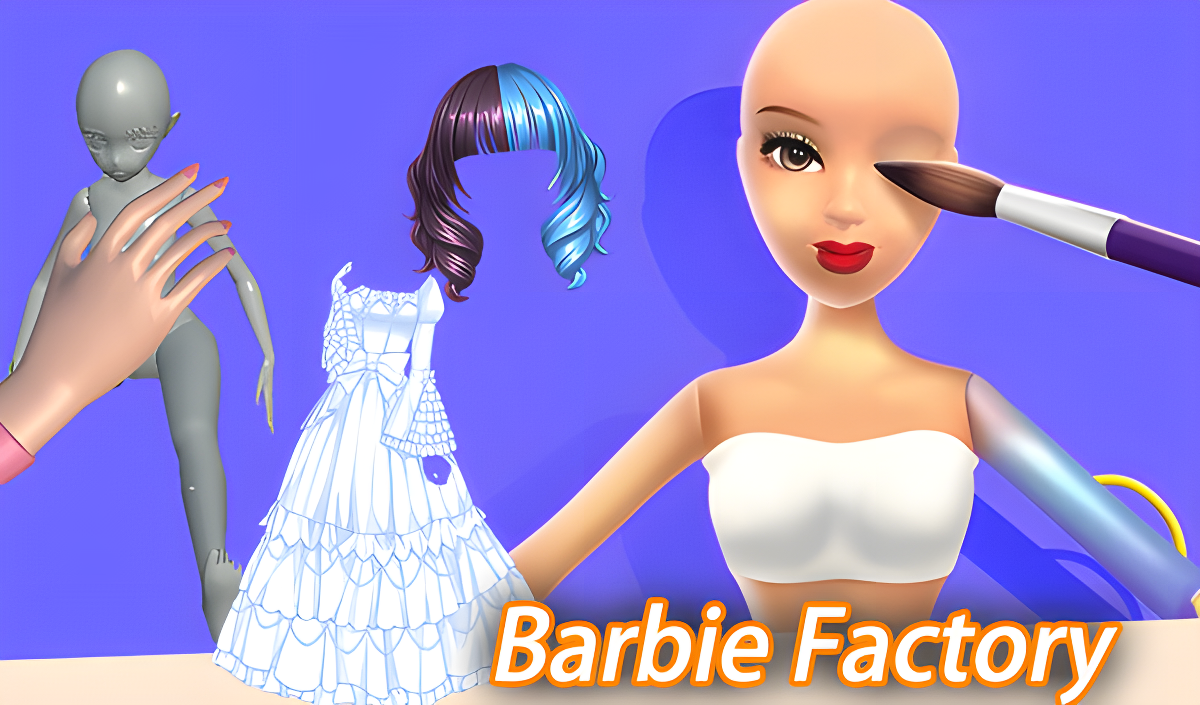
Ever played those satisfying assembly line games where you just collect stuff and watch it transform? Barbie Factory is exactly that—a hyper-casual runner where you steer a hand down a conveyor belt, grab doll parts, dodge obstacles, and customize your creations to sell for cash. It's got that Subway Surfers vibe but swapped the trains for a toy factory. Your goal: build the perfect dolls, avoid dropping them, and rake in money to upgrade your production line. Simple loop, weirdly addictive.
Key Features
- Assembly Line Gameplay: Collect doll parts while moving forward on a conveyor track.
- Customization Gates: Pass through machines that automatically dress, paint, and style your dolls.
- Obstacle Dodging: Mechanical claws and hazards try to steal your stack—navigate carefully.
- Incremental Upgrades: Spend earnings to unlock new outfits, hairstyles, and boost your factory's starting capacity.
How to Play Barbie Factory
Getting started is dead simple, but keeping your stack intact gets tricky fast.
Collect Doll Parts on the Track
You control a disembodied hand moving forward on a green-striped conveyor belt. Swipe left or right (on mobile) or use your mouse (on desktop) to steer. Gray, unfinished doll torsos line the path—guide your hand over them to scoop them up. The more you collect, the bigger your payout at the end.
Navigate Processing Gates and Hazards
Bright pink machines and other colorful gates pop up along the track. When you pass through them, your dolls get automatically painted, dressed, or styled. Sounds easy, right? Wrong. Mechanical grabbers and narrow passages show up to mess with you. If you hit one, you lose dolls from your stack. Lose them all, and it's game over. Stay centered and time your moves.
Cash In and Upgrade Your Factory
At the finish line, your assembled dolls get sold. Better customization equals higher prices. Use the cash to increase your starting doll count, unlock new clothing options, or level up your factory for even better profits. It's a classic incremental loop—play a round, earn money, upgrade, repeat.
Who is Barbie Factory for?
This is a casual, kid-friendly experience aimed at younger players or anyone looking to zone out for a few minutes. The bright colors, simple controls, and low-pressure gameplay make it perfect for the 8-to-16 crowd. No violence, no reading required—just collect, dodge, and customize. If you're hunting for a deep strategy game, this isn't it. But if you've got 10 minutes to kill and like satisfying progression loops, it works.
The Gameplay Vibe
It's smooth and mindless in the best way. The visuals are basic—flat shading, low-poly models, and those overly saturated "candy" colors designed to grab attention in TikTok clips. There's no soundtrack to speak of, just generic sound effects when you collect items or hit obstacles. The whole thing feels like it was built to be clipped and shared, not to be remembered. It's not breaking any originality records, but the dopamine hit of watching dolls get assembled and sold is real. Honestly, it's the kind of game you play while half-watching Netflix.
Technical Check: Saves & Performance
Your progress saves automatically in the browser cache, so as long as you don't wipe your history, you're good. The game runs buttery smooth even on older hardware—those ultra-simple graphics mean pretty much any device can handle it. I had zero lag on a budget laptop. One catch: if you're on mobile data, the game loads fine but watch for auto-playing ads if you're on a metered connection.
Quick Verdict: Pros & Cons
A decent time-killer with a satisfying core loop, but don't expect anything groundbreaking.
- ✅ Pro: Instant gratification—no tutorials, no waiting, just play.
- ✅ Pro: The customization gates are genuinely satisfying to pass through.
- ❌ Con: Gets repetitive fast. After 10 minutes, you've seen everything the game has to offer.
Controls
Responsive enough for a hyper-casual game. No complaints, though precision isn't really required here anyway.
- Desktop: Use your mouse to move left and right. Click and drag to steer the hand.
- Mobile: Swipe left or right on the screen to navigate. Touch controls work perfectly on tablets too.
Release Date & Developer
Developed by Cocos Labs and released on November 13, 2024. It's a fresh addition to the hyper-casual browser game scene, though it follows a well-worn formula.