


















 Melon Sandbox
 Sprunki Sandbox: Ragdoll Playground Mode
 Playground Man! Ragdoll Show!


Stick Create A Level
Stick Create A Level - Play Online
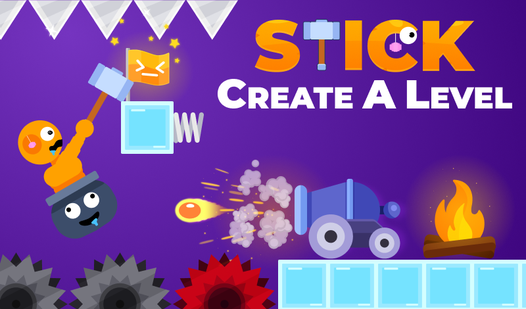
Build nightmare courses. Watch stickmen flail. Swing a hammer to climb through your own trap-filled chaos. Snap objects onto the grid—spikes, saws, cannons, springs—then test your creation with ragdoll physics that punish every mistake. Ragdoll games meet level-editor freedom in a sandbox where your imagination becomes someone else's torture chamber.
How to Play Stick Create A Level
Reach the goal flag. Smack your hammer to propel the pot-riding stickman forward. On desktop, WASD controls movement; mobile players tap screen buttons. One wrong swing sends you tumbling into spikes or saws. Checkpoints save progress through brutal sections, but respawning means restarting the gauntlet you designed. Edit mode pauses action—drag obstacles from the bottom toolbar, position them on the grid, hit play to validate your sadistic masterpiece.
Hammer Momentum and Ragdoll Control
Every hammer strike generates force in the direction you aim. Weak taps inch forward; full swings launch the stickman across gaps or into hazards. The ragdoll body reacts to collisions with exaggerated physics—limbs flail, the pot tilts, particle bursts explode on impact. Master short, controlled hits for tight corridors. Save aggressive swings for cannon launches or spring-boosted jumps. Ice tiles kill friction, turning every movement into a desperate slide toward spikes.
Editor Toolbox and Object Placement
Eight core objects unlock from the start: regular blocks for platforms, ice for slippery surfaces, saws that spin endlessly, spikes angled to impale, cannons firing timed projectiles, springs for vertical boosts, trampolines for horizontal flings, and save points to checkpoint progress. Grid snapping ensures pixel-perfect alignment. Undo button reverses mistakes. Move tool repositions existing hazards. Eraser deletes clutter. Place coins to bait risky maneuvers. Test the level by hitting the play button—if you can't beat it, neither can your friends.
Pro Tips for Maximum Frustration
Layer cannons near save points so players respawn directly into fire. Hide spikes behind regular blocks to create blind jumps. Stack trampolines to chain momentum into impossible arcs. Use ice before saw clusters to remove braking options. Place the goal flag one hammer-swing away from a spike pit. Watch players ragequit when they discover your spring launches them straight into ceiling saws. Colorful animations make every failure cartoonishly satisfying—screen-shake on collisions, limb separation on hard impacts, particle explosions marking each death.
Key Features
- Foddy-Style Hammer Mechanics: Swing to move a stickman trapped in a pot, where every input affects ragdoll momentum and trajectory.
- Flat Vector Aesthetic: High-contrast 2D art with basic particle systems and bright color palettes, optimized for instant browser performance.
- Eight Distinct Obstacles: Ice, saws, spikes, cannons, springs, trampolines, save points, and regular blocks combine into infinite trap configurations.
- Multiplayer Level Sharing: Build solo or with friends, then challenge others to survive your obstacle courses on any device.
Who is Stick Create A Level for?
Rage-game veterans craving user-generated punishment. Simulation games fans who want creative control over physics sandboxes. Mobile players hunting quick sessions of trial-and-error chaos. Anyone who enjoyed Getting Over It and wants to become the architect of that same hammer-swinging frustration. Teens and casual gamers looking for endless replayability through community-created levels. If you find satisfaction in Ragdoll Hit collisions or stickman slapstick, this editor hands you the keys to design your own physics-based nightmare courses.
Developer
Stick Create A Level was developed by Trash Games. The studio specializes in accessible sandbox experiences where hammer-physics locomotion meets grid-based level creation, delivering instant browser action across desktop and mobile platforms without downloads.
Controls
- WASD (Desktop): Move stickman and swing hammer.
- Screen Buttons (Mobile): Tap directional controls to hammer and navigate.
- Editor Toolbar: Click or tap objects to place, move, or delete obstacles on the grid.
- Play Button: Exit editor mode and test your level as a playable course.
- Undo Button: Reverse last placement or edit action.
FAQ
Can I play Stick Create A Level on mobile devices?
Yes. Stick Create A Level runs on Android and iOS through any browser. On-screen buttons replace WASD controls, and touch gestures handle object placement in editor mode, delivering the same hammer-physics gameplay across all devices.
How do I share levels with friends in Stick Create A Level?
Build your level using the editor, hit play to validate it works, then use the in-game sharing or multiplayer options. Friends access your course through a link or lobby system, depending on platform features enabled by the developer.
What happens when the stickman hits a saw or spike?
Impact triggers ragdoll separation—limbs scatter, particles explode, and the character respawns at the last save point. The cartoonish violence keeps the tone light while resetting progress, forcing you to reattempt the obstacle gauntlet from the checkpoint.
Is there a limit to how many objects I can place in one level?
The grid and device performance impose soft limits, but the editor allows extensive object placement. Layer spikes, cannons, springs, and ice until complexity matches your desired difficulty, then test to ensure the level remains playable and doesn't lag.
Can I play Stick Create A Level without building custom levels?
Yes. Jump into pre-built community levels or default courses to experience hammer-physics challenges immediately. Editor mode is optional—focus on surviving trap-filled obstacle courses designed by other players if you prefer pure platforming over creation.
Video